If you are comparing art collection management software, you have likely come across three names: Artopia, Artwork Archive, and Artlogic. They all help you organise artworks and store records, but they are built for very different users with very different needs and budgets.
This overview covers who each platform is designed for and what it costs. If you want a deeper look at any pair, see our detailed comparisons: Artopia vs Artwork Archive and Artopia vs Artlogic.
What is art collection management software?
Art collection management software is a dedicated platform for cataloguing, documenting, and organising artworks in a private collection. A good platform lets you store artwork details, images, provenance records, certificates of authenticity, condition reports, and location history in one place, and access that information whenever you need it.
The alternative, a spreadsheet, handles basic data but cannot store images alongside records, generate documents, or give you a shareable view of your collection. Dedicated software solves all of that.
Artopia vs Artwork Archive vs Artlogic: A quick comparison
| — | Artopia | Artwork Archive | Artlogic |
|---|---|---|---|
| Built for | Private collectors | Artists and collectors | Galleries and artists |
| Starting price | Free (up to 50 artworks) | From $8/month (up to 100 artworks) | From £81/month (collectors) |
| Free plan | Yes | No (14-day trial only) | No |
| Provenance tracking | Yes | Yes | Yes |
| Document storage | Yes | Yes | Yes |
| Shareable collection view | Yes | Paid tiers only | Yes (via app) |
| Best for | Collectors who want a clean, focused tool | Artists managing and selling work | Galleries and high-volume operations |
How Artopia stands out
Most art management tools were built for artists or galleries first, with collectors treated as a secondary audience. Artopia is different: it was designed specifically for the private collector, which shapes everything from the features included to the ones deliberately left out.
A few things that set Artopia apart:
Built for collectors, not adapted for them. Artwork Archive started as an artist tool. Artlogic is a gallery business platform. Artopia was built from the ground up for people who collect art, which means the interface, the record structure, and the feature set all reflect how collectors actually think about their collections.
Free to start, with no time limit. Most tools in this category offer a short trial and then require a subscription. Artopia's free tier has no expiry date and supports up to 100 artworks, giving you time to build your collection records without any financial commitment.
Clean and focused. There are no sales pipelines, consignment reports, or gallery CRM tools to navigate around. Every feature in Artopia is there because a collector needs it, not because it was inherited from a product built for a different kind of user.
Personal support. If you are migrating from another platform, the Artopia team will help you personally. No automated imports and hoping for the best.
Artopia
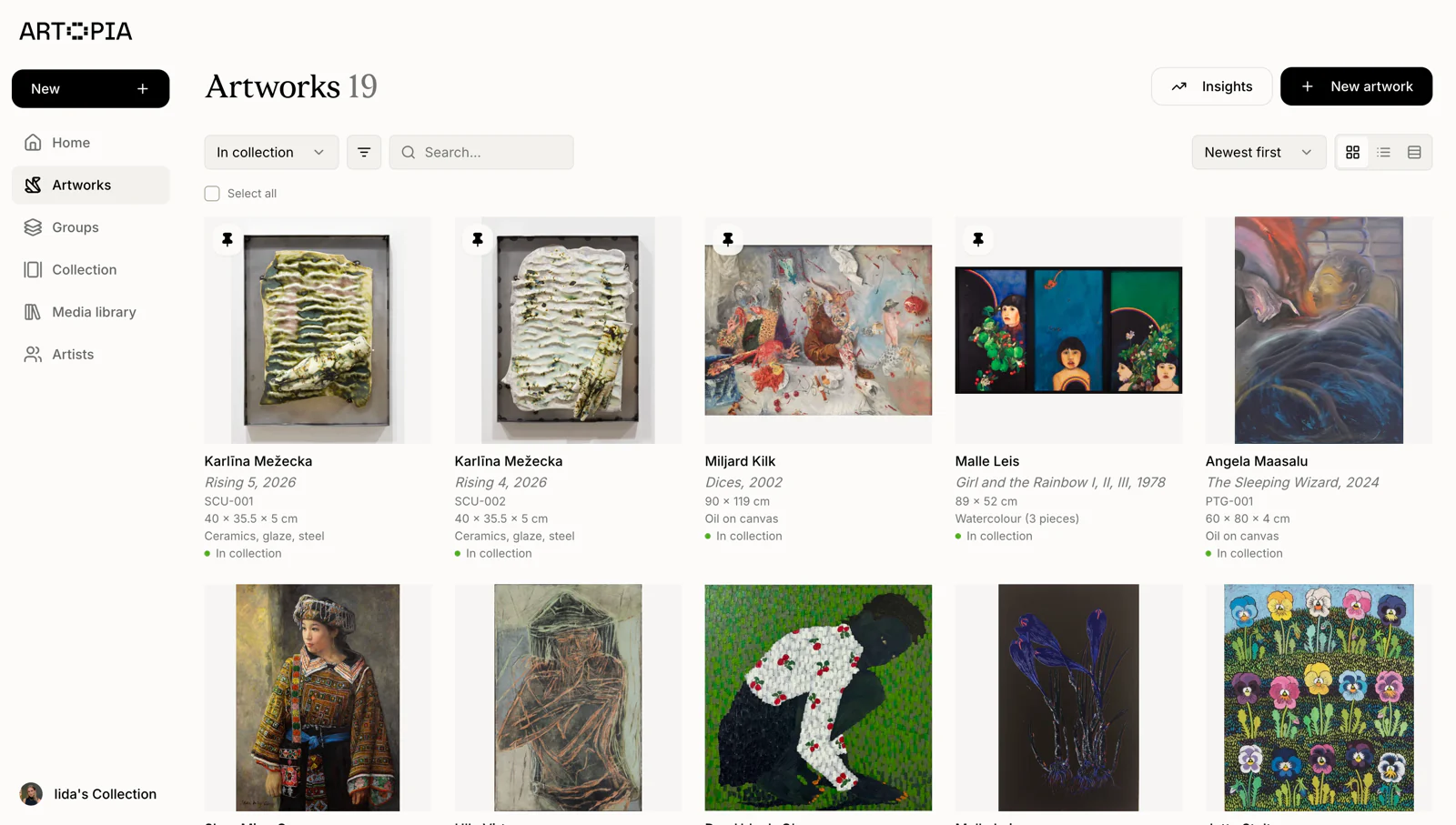
Artopia is an art collection management platform built specifically for private collectors. Each artwork record holds everything relevant to that piece: title, artist, dimensions, medium, acquisition details, location, provenance, condition, and attached documents like certificates of authenticity. You can upload images and share a public or private view of your collection with a link.
The platform focuses on what collectors actually need, without the sales pipelines, gallery CRM tools, or artist commission tracking that make other tools more complex than necessary.
Pricing: Free tier available with no time limit. Paid plans for larger collections and additional features. See full pricing.
Best for: Private collectors who want a focused, easy-to-use platform without paying for features they will never use.
Start managing your collection with Artopia
Artwork Archive
Artwork Archive is one of the longest-standing tools in this category, originally built for artists managing and selling their work. It has since added a collector product. The platform covers artwork cataloguing, location tracking, valuation records, COA generation, and consignment management, with a native iOS app for mobile access.
The entry-level plan limits you to 100 artworks. Unlimited artworks require the $24/month Master plan. There is no free tier.
Pricing: From $8/month (100 artworks) to $24/month (unlimited).
Best for: Artists who need to manage and sell work, or collectors who prioritise a native iOS app.
Full comparison: Artopia vs Artwork Archive
Artlogic
Artlogic is a professional platform used by galleries, dealers, and artists worldwide. It covers inventory management, CRM, sales pipelines, website integration, invoicing, and marketing tools. For galleries managing thousands of works with commercial operations, it is one of the most complete solutions available. There is also a collector-facing product for presenting and sharing collections.
The platform has a significant learning curve and pricing that reflects its gallery focus. Artist plans start from £81/month; gallery plans run considerably higher. For most private collectors, this means paying for substantial functionality they will never use.
Pricing: From £81/month (artists); gallery plans from £130+/month. No free plan.
Best for: Commercial galleries, art dealers, and artists running studio operations at scale.
Full comparison: Artopia vs Artlogic
Which art collection management software should you choose?
Choose Artopia if you are a private collector who want clean, focused software built for the way collectors actually think about their collections. A free tier lets you get started without any commitment.
Choose Artwork Archive if you are an artist managing and selling your work, or a collector who wants a native iOS app and is comfortable with a product that serves multiple audiences. Plan for at least $8/month, and $24/month if your collection exceeds 100 works.
Choose Artlogic if you run a gallery, art dealership, or artist studio with commercial operations at scale. It is comprehensive, but the price and complexity do not suit most private collectors.
Frequently asked questions:
What is the difference between Artopia, Artwork Archive, and Artlogic?
Artopia is designed specifically for private collectors, Artwork Archive for artists and collectors, and Artlogic for galleries and commercial art businesses. They differ significantly in pricing, feature focus, and complexity. Artopia offers a free tier; Artwork Archive starts at $8/month with no free plan; Artlogic starts at £81/month for artists.
Is there a free art collection management software?
Artopia offers a free tier with no time limit, making it the most accessible option for collectors who want to get started without a financial commitment. Artwork Archive and Artlogic offer trials only.
Is Artlogic worth it for a private collector?
For most private collectors, Artlogic is not the right fit. The platform is built for galleries and commercial operations, and its pricing reflects that. A collector-focused tool like Artopia will cover everything you actually need at a fraction of the cost.
Can I switch from Artwork Archive to Artopia?
Yes. Artopia supports CSV import, so you can export your records from Artwork Archive and bring them into Artopia. We also offer personal help with data migration — if you want assistance getting your collection moved over, reach out to us at app@art-opia.com and we will take care of it.
Choosing the right tool comes down to what you are actually trying to do. If you are a private collector who wants to document, organise, and protect your collection without paying for features built for galleries, Artopia is worth exploring.