If you are choosing between Artopia and Artwork Archive, you are likely a collector or artist looking for a better way to organise and document your collection. Both platforms handle the essentials: artwork records, images, provenance, and document storage. But they make very different choices about who they are built for, what they include, and what they cost.
This comparison breaks down both platforms honestly so you can decide which one fits your collection.
What is the difference between Artopia and Artwork Archive?
Artopia is built specifically for private collectors. Artwork Archive was built for artists managing and selling their work, and has since added a collector product. That difference in origin shapes everything: the features included, the complexity of the interface, and the pricing structure.
If you are a collector who wants a focused, clean tool without artist-facing features you will never use, Artopia is designed with you in mind. If you are an artist who also collects, or a collector who wants a native mobile app, Artwork Archive is worth considering.
Artopia vs Artwork Archive: A quick comparison
| — | Artopia | Artwork Archive |
|---|---|---|
| Built for | Private collectors | Artists and collectors |
| Starting price | Free (up to 50 artworks) | From $8/month (up to 100 artworks) |
| Free plan | Yes, no time limit | No (14-day trial only) |
| Unlimited artworks | Paid plan | From $24/month |
| Provenance tracking | Yes | Yes |
| Document storage | Yes | Yes |
| COA generation | Yes | Yes |
| Shareable collection view | Yes | Paid tiers only |
| Best for | Collectors who want a focused, private tool | Artists managing work, or collectors who want a mobile app |
Artopia
Artopia is an art collection management platform built from the ground up for private collectors. Every decision in the product reflects a single audience: people who collect art and want a clean, reliable place to document what they own.
What Artopia does well:
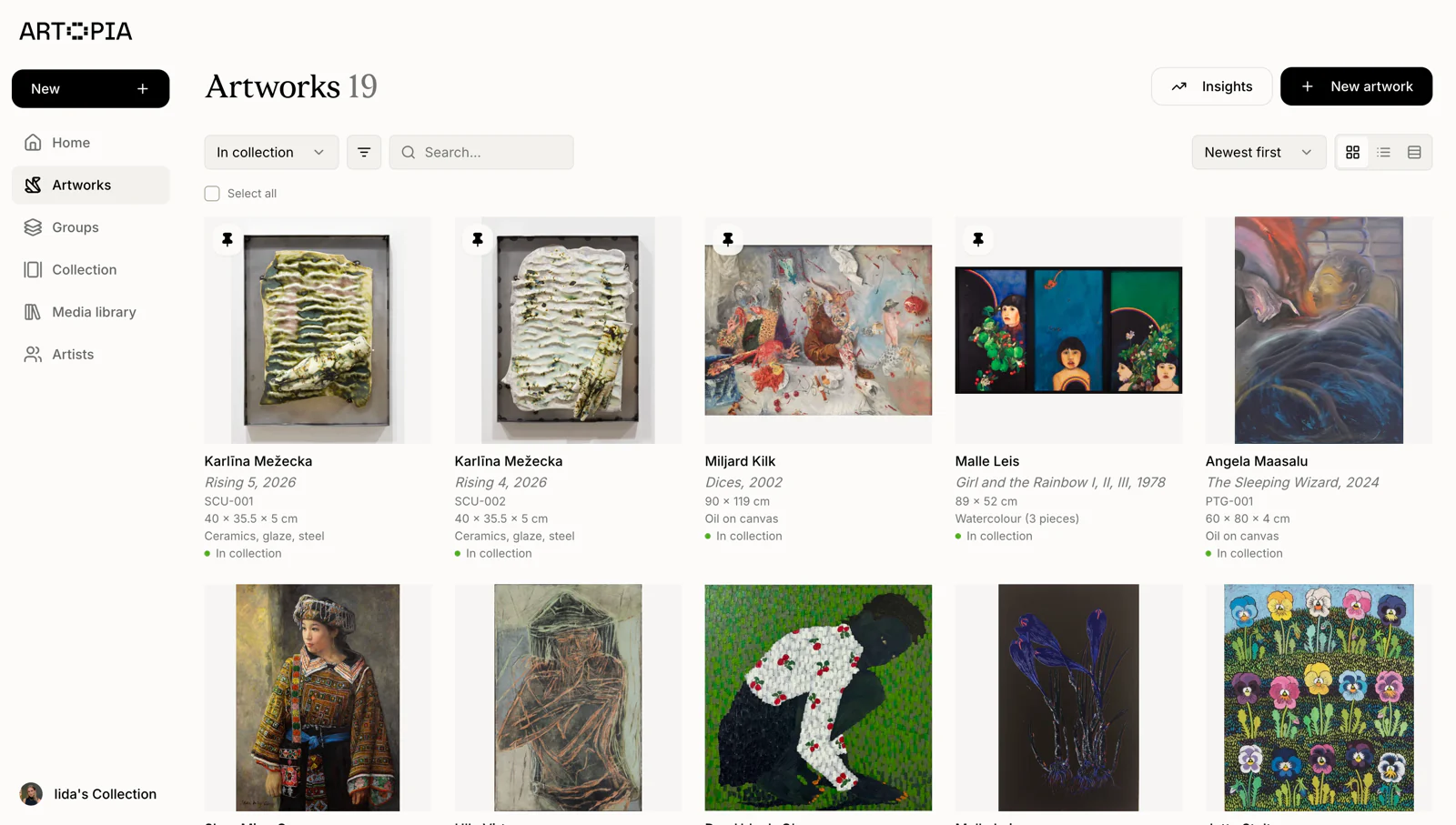
Each artwork record in Artopia holds everything relevant to that piece: title, artist, dimensions, medium, acquisition details, location, provenance, condition, and attached documents including certificates of authenticity and receipts. You can upload multiple images per artwork and share a public or private view of your collection with a link.
The interface is intentionally straightforward. There are no sales pipelines, consignment reports, or gallery CRM tools to navigate around. If you are a collector, you are not paying for features built for someone else.
Artopia also offers a free tier with no expiry date, supporting up to 50 artworks. This gives you time to build out your records and evaluate the platform properly before committing to a paid plan.
Where Artopia has limitations:
Artopia focuses on the core features collectors need, which means some of the more niche functionality is not yet included — there is no contact management or email templates, for example. That said, the platform is actively developed and welcomes feature requests. If something is missing that matters to your workflow, you can reach out and suggest it.
Pricing: Free tier available with no time limit (up to 50 artworks). See full pricing.
Best for: Private collectors who want a focused, easy-to-use platform without paying for features they will never use.
Start managing your collection with Artopia
Artwork Archive
Artwork Archive is one of the most established tools in the art management space. It launched as a platform for artists to manage, track, and sell their work, and has since expanded to include a collector-facing product.
What Artwork Archive does well:
For artists, Artwork Archive is genuinely comprehensive. It covers artwork cataloguing, consignment tracking, exhibition management, sales records, COA generation, and relationship management with galleries. The native iOS app is a real strength, letting you photograph and add artworks directly from your phone.
For collectors, it offers solid artwork records, location tracking, valuation history, and the ability to generate professional reports. If you are an artist who also collects, or want to manage both sides of your art life in one tool, Artwork Archive handles that well.
Where Artwork Archive falls short for collectors:
The platform's artist roots are visible throughout the interface. Features like consignment tracking, exhibition management, and gallery relationships are prominent, which adds navigation complexity for collectors who have no use for them.
Pricing is a meaningful consideration. The entry-level Apprentice plan at $8/month caps you at 100 artworks. Once your collection grows beyond that, you need the Master plan at $24/month for unlimited artworks. There is no free tier; the 14-day trial gives you limited time to evaluate the platform before committing.
Pricing: From $8/month (Apprentice, up to 100 artworks) to $24/month (Master, unlimited artworks). No free plan.
Best for: Artists managing and selling their work, or collectors who prioritise a native iOS app and are comfortable with a product that serves multiple user types.
How Artopia stands out for collectors
The core difference comes down to focus. Artwork Archive serves artists, collectors, and galleries. Artopia serves collectors specifically, which means:
No irrelevant features. You will not find consignment tracking, sales pipelines, or exhibition management in Artopia. What you will find is a clean record structure built around how collectors think about their acquisitions.
Free to start, no deadline. Artwork Archive's 14-day trial puts pressure on your evaluation. Artopia's free tier has no time limit. You can build out your collection records, test the sharing features, and decide whether a paid plan makes sense when you are ready.
Personal migration support. If you are moving from Artwork Archive, Artopia supports CSV import and the team will personally help you migrate your records. Reach out at app@art-opia.com and they will take care of it.
Which should you choose?
Choose Artopia if you are a private collector who wants software built specifically for the way collectors think about their collections. The free tier, clean interface, and collector-first feature set make it the stronger choice for anyone whose primary goal is documenting and organising what they own.
Choose Artwork Archive if you are an artist managing and selling your work, or a collector who wants more complexity — sales pipelines, schedules, and exhibition management alongside your collection records. Budget for at least $8/month, and $24/month as your collection grows.
Frequently asked questions
Is Artopia or Artwork Archive better for private collectors?
For private collectors, Artopia is the stronger fit. It is built specifically for collectors, with a clean interface that does not include the artist-facing features that add complexity to Artwork Archive. Artopia also offers a free tier with no time limit, while Artwork Archive requires a paid subscription after a 14-day trial.
Does Artwork Archive have a free plan?
No. Artwork Archive offers a 14-day free trial, after which you need a paid plan starting at $8/month. Artopia offers a free tier with no time limit for collections up to 100 artworks.
Can I migrate from Artwork Archive to Artopia?
Yes. Export your collection as a CSV from Artwork Archive and import it into Artopia. The Artopia team also offers personal help with migration — contact app@art-opia.com and they will assist you directly.
How does Artwork Archive pricing compare to Artopia?
Artwork Archive starts at $8/month for up to 100 artworks, rising to $24/month for unlimited artworks. Artopia offers a free tier for up to 100 artworks with no time limit, and paid plans for larger collections. See Artopia pricing.
Both platforms are capable tools, but they are built for different people. If you collect art and want software designed around that, Artopia is worth starting with.